


Surface
You open the laptop and twenty tabs greet you like unpaid rent. Slack badges stack. You walk into the kitchen, stop mid-step, and forget why you came. By 2 PM you feel like you ran a marathon, except your Fitbit shows 847 steps and your calendar shows three meetings where you mostly nodded.
That drained feeling is rarely laziness. It is often cognitive overload: your working memory is full, and every new ping, half-finished thought, and messy interface is competing for the few slots you have left. John Sweller's cognitive load theory gave this a name in instructional design research in the late 1980s, and it travels surprisingly well into knowledge work. If you want how to reduce cognitive load in practice, start by treating your brain like a machine with a hard RAM limit, then stop stuffing the RAM with junk.
You already know the symptoms in your bones. The question is whether you will keep blaming willpower, or finally redesign the inputs.
What is cognitive load, really?
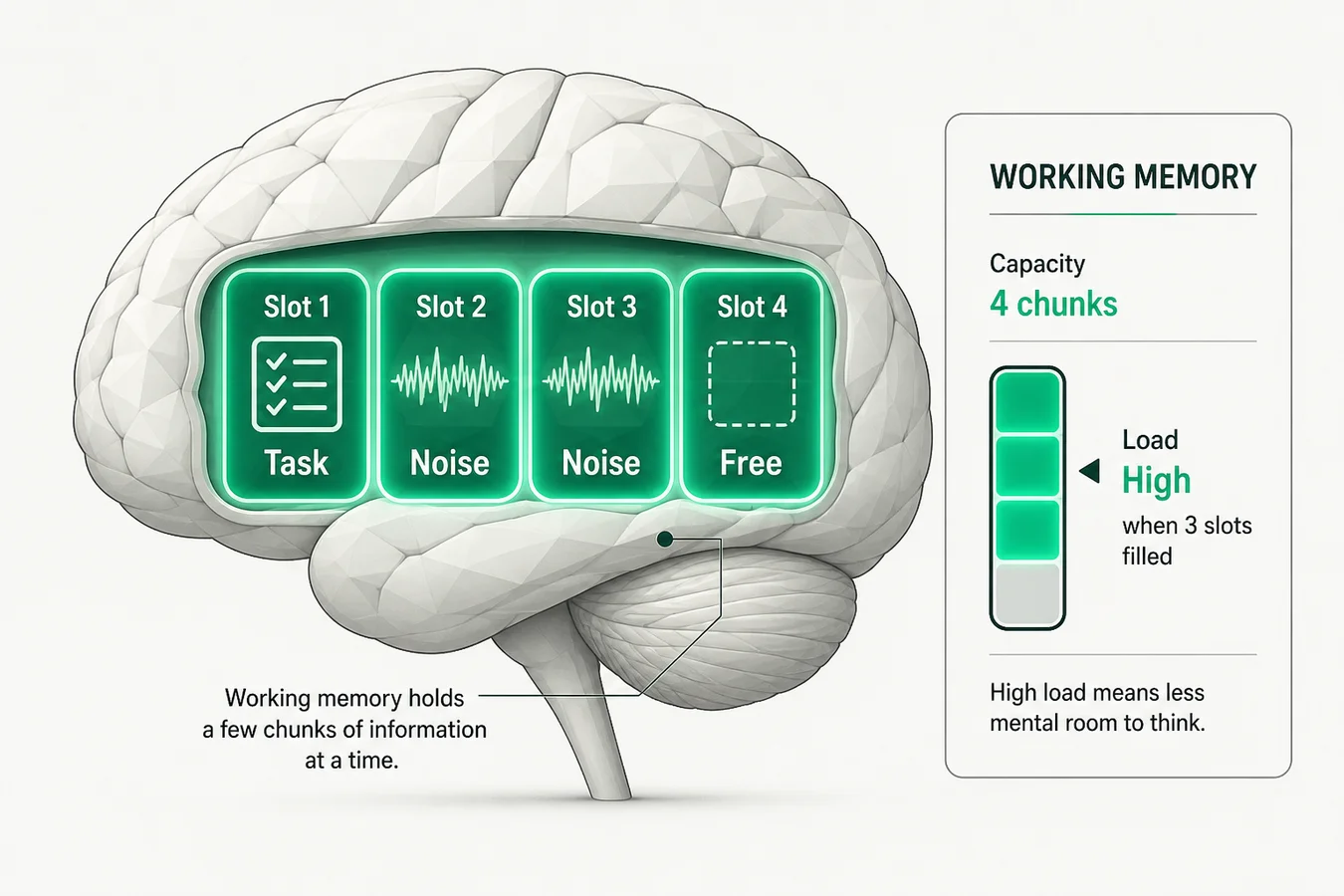
Think of working memory as the brain's RAM. George Miller's famous "seven plus or minus two" estimate from 1956 still gets quoted in meetings, but later work by Nelson Cowan and others puts the useful capacity closer to about four chunks for many adult tasks. Four active items. That is all. (See working memory for the research trail.)
Working memory capacity
Often quoted
7 ± 2
Miller, 1956 (items in span tasks)
Better estimate for complex work
~4
Cowan: about four active chunks
- Slack thread
- Open tabs
- Half-written reply
- Deep work
Insight: three noise slots leave one for real thinking. Clear noise first; do not ask the fourth slot to carry everything.
When those slots fill with noise, new information has nowhere to land. You reread the same paragraph. You lose the thread of a simple conversation. You feel brain fog even though you "did nothing." You did plenty. You just spent it on holding, switching, and recovering.
Sweller split load into three kinds. The useful move is knowing which kind to cut.
Three types of cognitive load
Intrinsic
The hard problem
New API, strategy memo, hard proof
Keep — reduce only by skill or scope
Extraneous
The junk tax
Bad UI, clutter, pings, unclear notes
Cut first — biggest free win
Germane
Skill-building effort
Connecting ideas, active recall
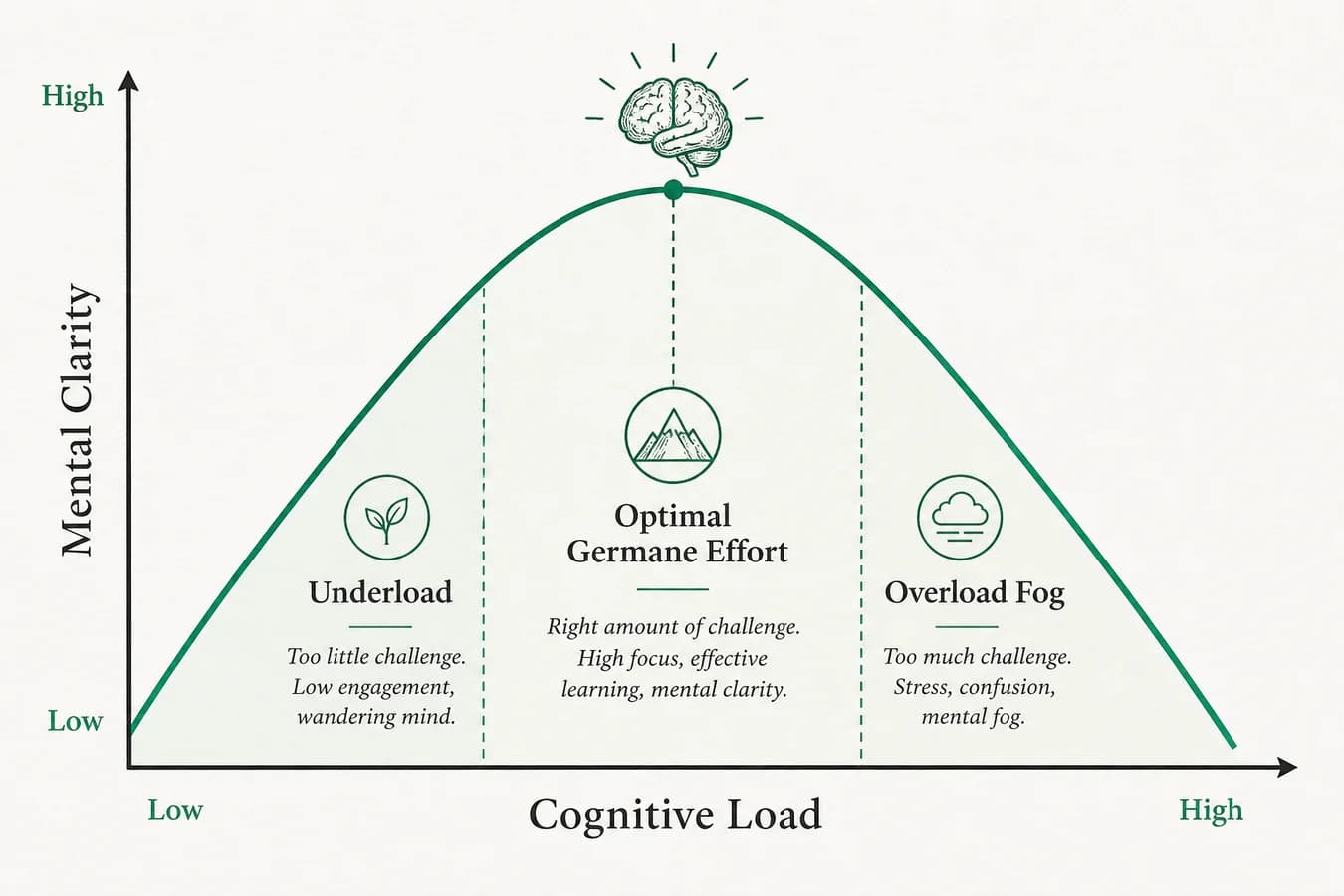
Protect — this is the good burn
Insight: most people push harder on intrinsic work while leaving extraneous load untouched. Delete the tax before you buy more effort.
| Type | What it is | Everyday example |
|---|---|---|
| Intrinsic load | Difficulty baked into the task itself | Learning a new API, drafting a hard strategy memo |
| Extraneous load | Friction that does not help learning or progress | Bad UI, cluttered desk, constant notifications, unclear notes |
| Germane load | Productive effort that builds long-term memory and skill | Connecting ideas, practicing retrieval, refining a mental model |
Intrinsic load is mostly fixed for a given skill level. Germane load is the good burn. Extraneous load is the tax. Teams and individuals often respond to mental fatigue by "working harder," which usually means stuffing more into the same four slots. The real win for mental clarity is removing extraneous load so the slots can hold the work that matters.
A useful self-check: ask which part of your current headache is the hard problem, and which part is packaging. Hard problem stays. Packaging is fair game for deletion, redesign, or deferral.
If you build products for a living, you already know this pattern in software: ship ownership without a clean handoff and the whole system feels heavier than the feature list suggests. Same thing happens inside your head. Unowned open loops burn RAM the way unclear AI product ownership after a demo burns a team.
A few numbers worth keeping in your pocket
You do not need a lab coat to use these figures. You need them as guardrails when someone says "just multitask harder."
- ~4 chunks in working memory for many adults (Cowan's line of work), not unlimited parallel tracks
- ~3 minutes average time on a computer screen before an interruption or switch in Gloria Mark's observational studies of knowledge workers; returning to the original task can take on the order of 20+ minutes of recovery
- American Psychological Association summaries on multitasking keep reminding us that rapid switching looks busy while accuracy and speed both take hits
- Sleep restriction of even one night reliably worsens attention and working-memory performance in lab studies; your 2 PM fog is often yesterday's bedtime wearing a costume
The real cost of an interruption
- 0:00
Deep focus
Working memory holds the problem model
- ~3 min
Interruption
Ping / tab hop / “quick question”
- + reload
Context rebuild
Slots refill: where was I, why, next step?
- ~20+ min
Back on track
Mark’s observational recovery window
Insight: a 20-second Slack glance is not a 20-second cost. The bill is the reload. Batch interrupts; protect recovery.
None of these numbers are destiny. They are evidence that your exhaustion has a mechanism, which means it has levers.
7 signs your cognitive load is too high
- You reread the same paragraph and still cannot paraphrase it
- Tiny decisions (reply now or later, which tool, which playlist) feel oddly heavy
- Irritability spikes after a morning of context switching
- You procrastinate on easy tasks because starting feels expensive
- You forget names, passwords, or why you opened a tab
- You finish the day exhausted with little deep work to show
- You keep adding apps "to get organized" and somehow feel worse
If three or more feel familiar, you are not broken. Your working memory is saturated.
9 science-backed ways to reduce cognitive load and activate your brain
These are the moves that free slots and push effort toward germane load. Use two tomorrow. Do not try all nine at once. That would be, ironically, more load.
1. Externalize your brain
Why: Working memory is temporary. Writing moves open loops out of RAM and into durable storage, which is the core idea behind second-brain systems and matches what CLT predicts: reduce holding costs so germane processing can happen.
How: Do a ten-minute brain dump at the start or end of the day. Capture every unfinished thought, worry, and task into one inbox note. Then sort once: next action, waiting, someday, or trash. Example: instead of mentally rehearsing "email Sara, fix invoice, buy detergent" while writing a brief, park those lines in the dump first, then write. The goal is not a prettier list. The goal is empty RAM before the hard work starts.
Mini-tip: One trusted inbox beats five clever folders you never open.
2. Single-task with timed focus blocks
Why: Task switching has a switching cost. Each hop forces working memory to reload context, which feels like fatigue even when the tasks are small. That is the same phenomenon behind the interruption recovery times in Mark's work.
How: Pick one outcome for a 25-minute Pomodoro. Close unrelated tabs. Silence non-emergency channels. When the timer ends, take a real break (stand, water, look outside), then choose the next single outcome. Example: "Outline section two of the proposal" is a block. "Catch up on everything" is a recipe for fog. If an interruption is truly urgent, write the recovery point on paper before you leave the block so restarting does not cost another five minutes of reconstruction.
Mini-tip: Put the next block's title at the top of your note before you start so restarting after a break costs almost nothing.
3. Chunk information with the rule of four
Why: Working memory holds chunks, not raw bits. Grouping reduces the number of slots a problem occupies, which is why experts look "smarter" on familiar boards: they see larger chunks.
How: When you face a messy list, force it into at most four buckets. Example: a chaotic product backlog becomes "must ship this week," "blocked," "nice later," and "kill." When learning, group related facts under one labeled chunk ("auth flow") instead of memorizing twelve disconnected steps.
Mini-tip: If you cannot explain your plan in four bullets, you do not have a plan yet. You have a pile.
4. Pre-decide to cut decision fatigue
Why: Decisions consume the same limited resource as focus. Repeated micro-choices (what to wear, where to work, which template) quietly exhaust you before the hard work starts.
How: Pre-decide defaults for recurring choices. Same breakfast on deep-work mornings. Same "first hour" ritual. Same response template for common emails. Example: founders choosing how to staff a build burn days on options; a clear frame like build with a partner versus hire engineers removes thrash so attention returns to the product problem.
Mini-tip: Write a tiny "defaults" note: tools, meeting days, deep-work hours. Edit it monthly, not hourly.
5. Clean the digital and physical field
Why: Visual and digital clutter acts as extraneous load. Your attention system keeps sampling the mess even when you think you are ignoring it. CLT would call most of that sampling non-germane.
How: Close tabs you are not using in this block. Mute channels that do not need you live. Clear the desk to the tools for the current task. Example: one document, one reference, one notebook. Everything else goes to a "parking" folder or a closed drawer for ninety minutes.
Mini-tip: A weekly thirty-minute "surface reset" (desktop, downloads, desk) prevents the slow creep that becomes Monday dread.
6. Prefer active recall over passive consumption
Why: Passive rereading feels productive and builds little durable memory. Retrieval practice (pulling an answer from memory) strengthens learning and frees future load because you stop re-deriving the same point every time. That is germane load done on purpose.
How: After a chapter, article, or meeting, close the source and write what you remember in plain language. Then check gaps. Example: instead of highlighting a PDF for forty minutes, spend ten minutes answering "What were the three claims?" from memory.
Mini-tip: Turn meeting notes into three questions you must answer tomorrow without looking. That is study mode for adults with calendars.
7. Interleave practice and teach what you learn
Why: Blocking one skill for hours can feel fluent while hiding weak understanding. Interleaving (mixing related skills) and teaching force clearer models, which is high-quality germane load.
How: Alternate related tasks instead of marathoning one type. Write for twenty minutes, review numbers for fifteen, return to writing. Once a week, explain a concept out loud to a teammate or to a voice note as if they are smart but new to the topic. The holes in your explanation are your curriculum.
Mini-tip: "Teach for two minutes" after any dense reading session. If you stall, you found the fog.
8. Schedule strategic boredom
Why: Constant input keeps the brain in reactive mode. Brief undistracted downtime engages the default mode network, which supports idea combination and memory consolidation. You are not "doing nothing." You are letting the system index.
How: Protect short empty windows: a walk without a podcast, a shower without a script, five minutes staring out a window between blocks. Example: after a hard scoping session, take a silent ten-minute walk before opening Slack. Teams that design calm operating cadence (see how we work) apply the same idea at organizational scale: fewer forced inputs, clearer thinking windows.
Mini-tip: Boredom only works if the phone stays away. A scroll break is entertainment, not recovery.
9. Use biological levers: sleep, movement, blood sugar
Why: Working memory sits on a body. Sleep debt, long sitting, and sharp glucose swings degrade attention and make ordinary tasks feel heavier than they are. No note-taking system outruns a chronically sleep-restricted cortex.
How: Guard a consistent sleep window when you can. Take a ten-minute walk after lunch instead of another tab binge. Pair focused work with protein and fiber rather than only sugar and caffeine spikes. Example: if your 2 PM crash is reliable, treat lunch composition and a short walk as focus tools, not wellness hobbies.
Mini-tip: Track one week of sleep and afternoon clarity. Patterns show up faster than motivation speeches.
The mistake most people make
When focus slips, the instinct is to add another productivity app, another dashboard, another system. Each tool promises clarity and arrives with setup, notifications, and a new vocabulary of statuses. That is fresh extraneous load wearing a helpful mask.
The better move is subtraction. Fewer inboxes. Fewer simultaneous goals. Fewer channels that can interrupt a focus block. Systems should shrink the number of things your working memory must hold, not create a second full-time job called "managing the system."
Watch for the tell: you spend more time configuring labels than finishing the task the labels were meant to support. That is the moment to delete a tool, collapse two lists into one, or go back to a plain note for a week and see whether clarity improves.
If your stack needs a weekly maintenance ritual longer than the work it organizes, the stack is the problem.
Start tomorrow with a 24-hour challenge
Pick two tactics from the list above for tomorrow only. Write them on a sticky note before you sleep. Run them for one day. Notice whether afternoon fog softens and whether deep work got easier to start.
Then tell us which two you chose and what shifted. Was it the brain dump, the muted Slack, the silent walk, or something else? The comment that helps someone else is the one with a specific experiment, not a vague vow to "focus more."
Reducing cognitive load is less about becoming a monk and more about respecting a four-slot machine in a fifty-slot world. Clear the junk. Keep the good effort. Think a little faster because you are carrying less.